Python Programming Notes - 9
Part – 1 : Programming Concept
1. Program
A Program is a set of instructions written in a high-level programming language to perform a specific task or solve a particular problem. The computer executes these instructions one by one to produce the desired output.
Example: A program to calculate the simple interest, display the multiplication table of a number, or find the largest among three numbers.
2. Program Development Life Cycle (PDLC)
The Program Development Life Cycle (PDLC) is a systematic process followed while developing a computer program. It helps programmers create efficient, reliable, and error-free programs.
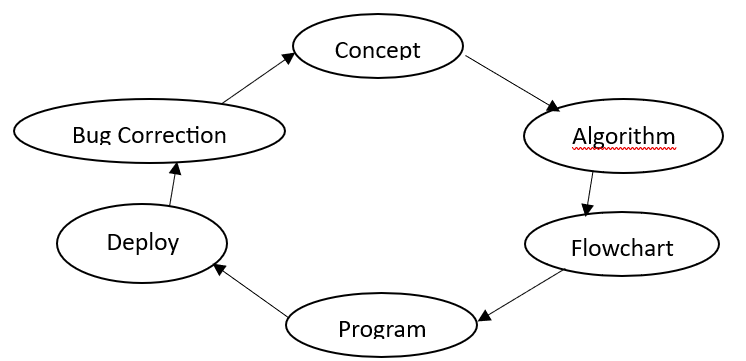
3. Algorithm
An Algorithm is a step-by-step procedure or set of instructions used to solve a problem or perform a specific task. Algorithms are written in simple language and are independent of any programming language.
Characteristics of an Algorithm:
- Easy to understand.
- Consists of finite steps.
- Produces the desired output.
- Helps in planning a program before coding.
4. Flowchart
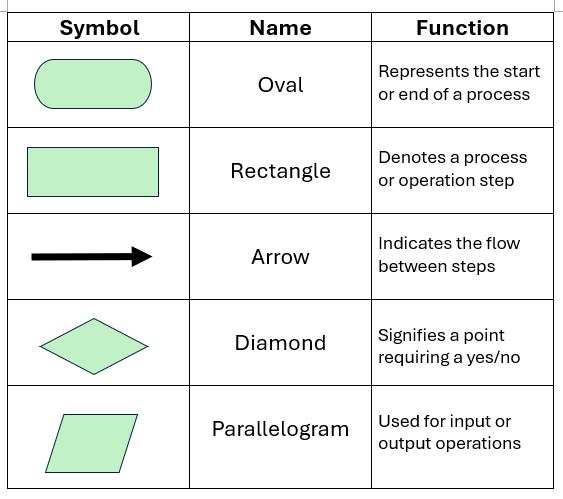
A Flowchart is the graphical representation of an algorithm using different standard symbols connected with arrows to show the sequence of execution.
Flowcharts make it easier to understand the logic of a program before writing the actual code.
Practice Algorithms and Flowcharts
Create algorithms and flowcharts for the following problems:
- To prepare tea.
- To add two numbers.
- To find the product of three numbers.
- To calculate the simple interest.
Note: The above questions are based on a Sequential Program Flow.
5. Program Flow
Program Flow is the direction in which a program executes. It describes how the statements of a program are executed and determines the possible outcomes of the program.
There are three types of program flow structures in programming:
- Sequential Flow
- Conditional Flow
- Iterative (Looping) Flow
1. Sequential Flow
Sequential Flow is the simplest program flow in which statements are executed one after another in the order they appear. There is only one starting point and one ending point without any decision-making or repetition.
Structure:
- One Start
- Sequential execution of statements
- One End
    Start
      ↓
    Step 1
      ↓
    Step 2
      ↓
    Step 3
      ↓
    Stop
2. Conditional Flow
Conditional Flow is a program flow in which a condition is checked before deciding which path the program should follow. Depending on whether the condition is true or false, different statements are executed.
Structure:
- One Start
- Sequential execution
- One Decision Box
- Multiple possible results
Condition Checking:
    Step X: Is condition?
          Yes → Result 1
          No  → Result 2
Note: The keyword goto can be used to point the program flow directly to a particular step. It is better understood while studying looping.
3. Iterative (Looping) Flow
Iterative Flow, also known as Looping, is a program flow in which a set of statements is repeated as long as a certain condition remains true. When the condition becomes false, the loop ends and the program continues with the next statement.
Structure:
    Step X: Is condition?
          Yes → Go to Step Y
          No  → Go to Step Z
    Step Y: Perform Calculation, Go to Step X
    Step Z: Stop
Looping is mainly used when the same task needs to be performed repeatedly without writing the same statements multiple times.
Practice Algorithms and Flowcharts
Sequential- To add two numbers.
- To find the simple interest when principle, time and rate is given by the user.
- To find the area of rectangle.
- To find the volume of cylinder.
- To check if a person is eligible to vote or not.
- To find the greater of two numbers.
- To find the smallest of three numbers.
- To check if a number is even or odd.
- To check if a number is positive, negative or zero.
- To display your name 10 times.
- To display the table of 3 upto the 10th multiple.
- To display even numbers upto 200.
- To display odd numbers from 100 to 200.
Basic Terminologies
1. Programming Language
A programming language is a formal language used to write instructions that a computer can understand and execute to perform a specific task.
Examples: Python, C, C++, Java, JavaScript, etc.
2. Programmer
A programmer is a person who writes, tests, debugs, and maintains computer programs using one or more programming languages.
3. Programming
Programming is the process of designing, writing, testing, debugging, and maintaining a computer program using a programming language.
4. Syntax
Syntax refers to the set of rules that determine how statements and instructions must be written in a programming language. If these rules are not followed, a syntax error may occur.
Example in Python:
print("Hello World")Types of Programming Languages
Programming languages can be broadly classified into the following types:
1. Machine Language
Machine language is the lowest-level programming language that consists of binary digits (0 and 1) and can be directly understood and executed by the computer.
Example:
10110000 011000012. Assembly Language
Assembly language is a low-level programming language that uses symbolic instructions or mnemonics instead of binary numbers. It requires an assembler to convert the instructions into machine language.
Examples of mnemonics:
- ADD
- MOV
- SUB
3. High-Level Language
A high-level language is a programming language that uses English-like words and mathematical symbols, making it easier for humans to read, write, and understand. It requires a compiler or interpreter to translate the program into machine-understandable instructions.
Examples: Python, C, C++, Java, BASIC, etc.
Advantages of Writing an Algorithm
- Provides a clear solution.
- Makes programming easier.
- Makes debugging easier.
Advantages of Designing a Flowchart
- Easy to understand.
- Helps in identifying errors.
- Helps in program development.
Coding
Coding is the process of converting an algorithm or program design into instructions using a particular programming language.
For example, writing a Python program based on an algorithm is called coding.
Testing
Testing is the process of executing a program with different inputs to check whether it produces the expected output and works correctly.
Types of Testing
Software testing can be broadly classified into Black Box Testing and White Box Testing.
1. Black Box Testing
Black box testing is a type of testing in which the tester checks the functionality and output of a program without knowing or examining its internal source code or implementation.
The tester mainly focuses on inputs and expected outputs.
Example:
A tester enters different usernames and passwords into a login system and checks whether the correct result is produced.
2. White Box Testing
White box testing is a type of testing in which the tester examines the internal structure, logic, and source code of a program while testing it.
The tester checks whether the different statements, conditions, loops, and paths of the program work correctly.
Example:
A programmer examines whether every condition in an if-else statement and every iteration of a loop works correctly.
Debugging
Debugging is the process of identifying, locating, and correcting errors or bugs in a computer program.
Example: If a program produces an incorrect result because of an incorrect calculation, finding and correcting that mistake is debugging.
Difference Between Compiler and Interpreter
| A compiler translates the entire source program into machine code before execution. | An interpreter translates and executes the source program one statement at a time. |
| A compiler generally reports errors after analyzing the source program during compilation. | An interpreter generally reports an error when it reaches the statement containing the error during execution. |
| A compiled program generally executes faster because the translation has already been completed before execution. | An interpreted program generally executes more slowly because translation takes place during execution. |
Part – 2 : Python Basics
Python
Python is a high-level, interpreted, general-purpose programming language used to develop software, websites, applications, automation scripts, data analysis programs, artificial intelligence systems, and many other types of software.
Python was designed by Guido van Rossum and was first released in 1991.
Key Features of Python
- Python has a simple and easy-to-understand syntax.
- It is an interpreted programming language.
- It supports object-oriented programming.
- It is a high-level programming language.
- Python is case-sensitive.
Advantages of Python
- Easy to Learn
- Free and Open Source
- Cross-Platform
- Large Library Support
Variable
A variable is a name given to a memory location that is used to store a value in a program.
In Python, a variable is created when a value is assigned to it using the assignment operator (=).
Syntax
variable_name = valueExamples
name = "Tejas"
age = 25
marks = 85.5
Python does not require the programmer to declare the data type of a variable explicitly.
Rules for Naming Variables in Python
The following rules should be followed when naming a variable:
- A variable name must begin with a letter or an underscore (_).
- A variable name cannot begin with a number.
- A variable name can contain letters, digits, and underscores.
- Spaces are not allowed in variable names.
- Python variable names are case-sensitive.
-
Python keywords cannot be used as variable names.
Example:if = 10 # Invalid - Variable names should be meaningful and descriptive.
- Special symbols such as @, #, $, %, etc. cannot be used in variable names.
Operators
An operator is a symbol or special keyword used to perform an operation on one or more values or variables.
The values or variables on which an operator works are called operands.
Example
a + bHere, + is the operator, while a and b are operands.
Types of Operators in Python
The major types of operators in Python are:
- Arithmetic Operators
- Relational Operators
- Assignment Operators
- Logical Operators
1. Arithmetic Operators
Arithmetic operators are used to perform mathematical calculations.
| Operator | Meaning | Example | Result |
|---|---|---|---|
| + | Addition | 10 + 3 | 13 |
| - | Subtraction | 10 - 3 | 7 |
| * | Multiplication | 10 * 3 | 30 |
| / | Division | 10 / 3 | 3.333... |
| // | Integer Division | 10 // 3 | 3 |
| % | Modulus | 10 % 3 | 1 |
| ** | Exponentiation | 10 ** 3 | 1000 |
2. Relational/Comparison Operators
Comparison operators are used to compare two values. They return either True or False.
| Operator | Meaning | Example |
|---|---|---|
| == | Equal to | 5 == 5 |
| != | Not equal to | 5 != 3 |
| > | Greater than | 5 > 3 |
| < | Less than | 3 < 5 |
| >= | Greater than or equal to | 5 >= 5 |
| <= | Less than or equal to | 3 <= 5 |
3. Assignment Operators
Assignment operators are used to assign or update values in variables.
| Operator | Meaning | Example |
|---|---|---|
| = | Assign | x = 10 |
| += | Add and assign | x += 5 |
| -= | Subtract and assign | x -= 5 |
| *= | Multiply and assign | x *= 5 |
| /= | Divide and assign | x /= 5 |
| //= | Floor divide and assign | x //= 5 |
| %= | Modulus and assign | x %= 5 |
| **= | Exponentiate and assign | x **= 2 |
4. Logical Operators
Logical operators are used to combine or reverse conditions.
| Operator | Meaning |
|---|---|
| and | Returns True if both conditions are true |
| or | Returns True if at least one condition is true |
| not | Reverses the result of a condition |
Basic Data Types in Python
A data type specifies the type of value stored or represented in a program. Python provides several built-in data types.
The basic data types commonly used in Python are:
- Integer (int)
- Floating Point (float)
- Boolean (bool)
- String (str)
1. Integer (int)
The int data type is used to store whole numbers without decimal points.
Example
age = 20Integers can be positive, negative, or zero.
2. Floating Point (float)
The float data type is used to store numbers containing decimal points.
Example
price = 99.503. Boolean (bool)
The Boolean data type represents one of two possible values:
- True
- False
Boolean values are commonly used in conditions and decision-making.
Example
age = 20
print(age >= 18)
Output
True4. String (str)
A string is a sequence of characters enclosed within single quotes, double quotes, or triple quotes.
Strings can contain letters, numbers, spaces, and special characters.
Example
course = "Python Programming"Python Sequential Programs
  #sum of 2 numbers
  a=int(input("Enter first number:"))
  b=int(input("Enter second number:"))
  s=a+b
  print(f"The sum of {a} and {b} is {s}.")

  #Simple interest
  p=int(input("Enter Principle:"))
  t=int(input("Enter Time:"))
  r=int(input("Enter Rate:"))
  si=(p*t*r)/100
  print("Simple Interest:",si)

  #Area of Circle
  r=int(input("Enter radius:"))
  area=(22/7)*r**2
  print("Area:",area)

  #Volume of cylinder
  r=int(input("Enter radius:"))
  h=int(input("Enter height:"))
  volume=(22/7)*(r**2)*h
  print(f"Volume: {volume}")

  #Temperature Conversion
  c=float(input("Enter celsius:"))
  f=(9/5)*c+32
  print(f"Conversion of {c}C: {f}F.")

  #Time Conversion
  mins=int(input("Enter minutes:"))
  hrs=mins//60
  minutes=mins%60
  print(f"{mins} mins : {hrs} hrs and {minutes} mins.")

  #Time Conversion - 2
  days=int(input("Enter days:"))
  yrs=days//365
  rem_days=days%365
  months=rem_days//30
  final_days=rem_days%30
  print(f"{days}days : {yrs} yrs {months} months {final_days} days.")
Part – 3 : Conditional Programming
Introduction
In Python programming, sometimes we need to make a decision based on a condition.
For example:
- If a student scores 40 or more marks, the student passes.
- If a person's age is 18 or more, the person can vote.
- If a number is divisible by 2, it is even.
To make such decisions, Python provides conditional statements.
Definition
A conditional statement is a statement that allows a program to make decisions and execute different instructions depending on whether a condition is True or False.
What is a Condition?
A condition is an expression that produces either:
- True
- False
Example:
    age = 18

    print(age >= 18)
Output:
TrueTypes of Conditional Statements
Python mainly provides the following conditional statements:
ifstatementif-elsestatementif-elif-elsestatement- Nested
ifstatement
The if Statement
The if statement executes a block of code only when a
condition is True.
Syntax:
    if condition:
        statement
Notice the colon (:) after the condition.
Example:
    age = 20
    if age >= 18:
        print("You are eligible to vote.")
Output:
You are eligible to vote.
If the condition is false, the statement inside the if
block is not executed.
Indentation in Python
Python uses indentation to identify a block of code.
    age = 20
    if age >= 18:
        print("Adult")
The print() statement is indented, so Python knows that it
belongs to the if statement.
Incorrect:
    age = 20
    if age >= 18:
    print("Adult")
This produces an indentation error.
Remember
After a conditional statement, use:
- A colon (:)
- Proper indentation
The if-else Statement
The if-else statement is used when there are
two possible outcomes.
Syntax:
    if condition:
        statement1
    else:
        statement2
If the condition is True, the if block executes.
If the condition is False, the else block executes.
Example:
    marks = 65
    if marks >= 40:
        print("Pass")
    else:
        print("Fail")
Output:
PassAnother Example:
    number = 7
    if number % 2 == 0:
        print("Even")
    else:
        print("Odd")
Output:
Odd
Here, % is the modulus operator, which gives the
remainder.
The if-elif-else Statement
Sometimes a program needs to check more than two conditions.
In such cases, we use if-elif-else.
Syntax:
    if condition1:
        statement1
    elif condition2:
        statement2
    elif condition3:
        statement3
    else:
        statement4
Python checks the conditions from top to bottom.
The first condition that is True is executed.
Example: Grade System
    marks = 75
    if marks >= 80:
        print("Grade A")
    elif marks >= 60:
        print("Grade B")
    elif marks >= 40:
        print("Grade C")
    else:
        print("Fail")
Output:
Grade BHow it works
For marks = 75:
75 >= 80→ False75 >= 60→ True- Therefore, "Grade B" is printed.
- Python does not check the remaining conditions.
The else Statement
The else block is executed when none of the previous
conditions are true.
Example:
    temperature = 15
    if temperature > 30:
        print("Hot")
    elif temperature >= 20:
        print("Warm")
    else:
        print("Cold")
Output:
Cold
The else statement does not have a condition.
Nested if Statement
An if statement placed inside another if
statement is called a nested if statement.
Example:
age = 20
    citizen = True

    if age >= 18:
        if citizen:
            print("Eligible to vote")
Output:
Eligible to vote
The inner if is checked only when the outer
if condition is true.
Example: Check Positive or Negative
    number = int(input("Enter a number: "))
    if number >= 0:
        print("Positive")
    else:
        print("Negative")
Example Output:
Enter a number: -5
    Negative
Example: Find the Greater Number
    a = int(input("Enter first number: "))
    b = int(input("Enter second number: "))
    if a > b:
        print("First number is greater")
    elif b > a:
        print("Second number is greater")
    else:
        print("Both numbers are equal")
Example: Check Voting Eligibility
    age = int(input("Enter your age: "))
    if age >= 18:
        print("Eligible to vote")
    else:
        print("Not eligible to vote")
Example: Simple Calculator Using Conditions
    a = int(input("Enter first number: "))
    b = int(input("Enter second number: "))
    operator = input("Enter operator (+ or -): ")
    if operator == "+":
        print(a + b)
    elif operator == "-":
        print(a - b)
    else:
        print("Invalid operator")
Common Mistakes
Mistake 1: Using = instead of ==
Incorrect:
    if age = 18:
        print("Adult")
Correct:
    if age == 18:
        print("Adult")
Mistake 2: Forgetting the colon
Incorrect:
    if marks >= 40
        print("Pass")
Correct:
    if marks >= 40:
        print("Pass")
Mistake 3: Incorrect indentation
Incorrect:
    if age >= 18:
    print("Adult")
Correct:
    if age >= 18:
        print("Adult")
C. Programming Exercises
- Write a program to check whether a number is positive or negative.
- Write a program to check whether a number is even or odd.
n=int(input("Enter any number:")) if (n%2==0): print(f"{n} is an even number.") else: print(f"{n} is an odd number.") -
Write a program to check whether a student has passed or failed.
Consider 40 as the passing mark.
marks=int(input("Enter your marks:")) if marks>=40: print("You have passed.") else: print("You have failed.") - Write a program to find the greater of two numbers.
a=int(input("Enter first number:")) b=int(input("Enter second number:")) if a>b: print(a,"is greatest.") else: print(b,"is greatest.") - Write a program to check whether a person is eligible to vote.
age=int(input("Enter age:")) if age>=18: print("You are eligible to vote.") else: print("You are not eligible to vote.") - Write a program to display a grade based on marks.
marks=int(input("Enter marks:")) if marks>=90: grade="A" elif marks>=80: grade="B" elif marks>=70: grade="C" else: grade="F" print("Grade:",grade) - Write a program to check whether a number is divisible by 5.
number=int(input("Enter number:")) if number%5==0: print(number,"is divisible by 5.") else: print(number,"is not divisible by 5.") - Write a program to find the greatest among three numbers.
a=int(input("Enter first number:")) b=int(input("Enter second number:")) c=int(input("Enter third number:")) if(a>b): g=a else: g=b print(f"{g} is greater of {a} and {b}.") if (g>c): print(f"{g} is the greatest of three numbers.") else: print(f"{c} is the greatest of three numbers.") - Write a program to check whether a given year is a leap year.
year = int(input("Enter a year: ")) if (year % 4 == 0 and year % 100 != 0) or (year % 400 == 0): print(f"{year} is a leap year.") else: print(f"{year} is not a leap year.") -
Write a program that accepts a student's marks and displays
Excellent, Good, Average, or Fail according to the marks.
marks=int(input("Enter marks:")) if marks>=90: remarks="Excellent" elif marks>=80: remarks="Good" elif marks>=70: remarks="Average" else: remarks="Fail" print(remarks) -
Write a program to input three sides of a triangle and check whether the triangle is quilateral, isoceles or scalene.
a=int(input("Enter first side:")) b=int(input("Enter second side:")) c=int(input("Enter third side:")) if a==b==c: print("Equilateral Triangle.") elif a!=b!=c: print("Scalene Triangle.") else: print("Isoceles Triangle.") -
Write a program to input three angles of a triangle and check whether the triangle is right angled triangle or not.
a=int(input("Enter first angle:")) b=int(input("Enter second angle:")) c=int(input("Enter third angle:")) if ((a+b+c==180) and (a==90 or b==90 or c==90)): print("Right-angled Triangle.") else: print("Not Right-angled Triangle.") -
Write a program to display middle number among three numbers.
num1=int(input("Enter first number:")) num2=int(input("Enter second number:")) num3=int(input("Enter third number:")) if (num2 <= num1 <= num3) or (num3 <= num1 <= num2): middle = num1 elif (num1 <= num2 <= num3) or (num3 <= num2 <= num1): middle = num2 else: middle = num3 print(f"The middle number is {middle}.") -
Write a program to display profit or loss amount.
sp=int(input("Enter selling price:")) cp=int(input("Enter cost price:")) if sp>cp: print(f"The profit amount is: {sp-cp}") elif cp>sp: print(f"The loss amount is: {cp-sp}") else: print("Neither Profit nor Loss.")
n=int(input("Enter a number:"))
if(n>0):
	print("The number is Positive.")
elif (n<0):
	print("The number is Negative.")
Part – 4 : Looping Concept
Python Looping
Introduction to Looping
In Python, a loop is used to execute a block of statements repeatedly as long as a specified condition is satisfied or for each item in a sequence.
Looping helps us perform a task multiple times without writing the same statements again and again.
Example without a loop:
print("Hello")
print("Hello")
print("Hello")
print("Hello")
print("Hello")
The same task can be performed using a loop:
for i in range(5):
    print("Hello")
Here, the print() statement is executed 5 times.
Types of Loops in Python
Python mainly provides two types of loops:
- for loop
- while loop
for Loop
A for loop is used to repeat a block of statements for each item in a sequence or a specified range of values.
Syntax
for variable in sequence:
    statement
Here:
- for is a Python keyword.
- variable stores the current value.
- in is used to check values from the sequence.
- sequence contains the values to be processed.
- The statements inside the loop must be properly indented.
Example
for i in range(1, 6):
    print(i)
Output:
1
2
3
4
5
The range(1, 6) generates numbers from 1 to 5. The ending value 6 is not included.
Using for Loop with a String
A for loop can also be used to access each character of a string.
name = "Python"
for ch in name:
    print(ch)
Output:
P
y
t
h
o
n
The range() Function
The range() function is commonly used with a for loop to generate a sequence of numbers.
1. range(stop)
for i in range(5):
    print(i)
Output:
0
1
2
3
4
The sequence starts from 0 and ends before 5.
2. range(start, stop)
for i in range(2, 7):
    print(i)
Output:
2
3
4
5
6
3. range(start, stop, step)
for i in range(2, 11, 2):
    print(i)
Output:
2
4
6
8
10
Here, 2 is the starting value, 11 is the ending limit, and 2 is the step value.
Examples of for Loop
Display numbers from 1 to 10
for i in range(1, 11):
    print(i)
Display even numbers from 1 to 20
for i in range(2, 21, 2):
    print(i)
Output:
2
4
6
8
10
12
14
16
18
20
Find the sum of numbers from 1 to 10
total = 0
for i in range(1, 11):
    total = total + i
print("Sum =", total)
Output:
Sum = 55Display multiplication table
n = int(input("Enter a number: "))
for i in range(1, 11):
    print(n, "x", i, "=", n * i)
Note: If the user enters 5:
5 x 1 = 5
5 x 2 = 10
...
5 x 10 = 50
while Loop
A while loop is used to repeatedly execute a block of statements as long as a given condition is True.
Syntax
while condition:
    statement
The condition is checked before every repetition.
If the condition is True, the statements inside the loop are executed.
If the condition becomes False, the loop stops.
Example of while Loop
i = 1
while i <= 5:
    print(i)
    i = i + 1
Output:
1
2
3
4
5
How it works
- Initially, i = 1.
- i <= 5 is checked.
- The value of i is displayed.
- i is increased by 1.
- The condition is checked again.
- The loop stops when i becomes 6.
Important Point in while Loop
The loop variable should generally be updated inside the loop.
i = i + 1If we forget to update i, the condition may remain True indefinitely and create an infinite loop.
In this program, if i never changes, the condition always remains true.
Examples of while Loop
Display numbers from 1 to 10
i = 1
while i <= 10:
    print(i)
    i = i + 1
Display even numbers from 2 to 20
i = 2
while i <= 20:
    print(i)
    i = i + 2
Display numbers from 10 to 1
i = 10
while i >= 1:
    print(i)
    i = i - 1
Find the sum of numbers from 1 to 10
i = 1
total = 0
while i <= 10:
    total = total + i
    i = i + 1
print("Sum =", total)
Output:
Sum = 55Difference Between for Loop and while Loop
| for Loop | while Loop |
|---|---|
| Used when the number of repetitions or sequence is generally known. | Used when repetition depends mainly on a condition. |
| Commonly used with range(). | Uses a condition. |
| The loop variable is commonly handled by the loop structure. | The loop variable usually needs to be updated manually. |
Nested Loop
A nested loop is a loop inside another loop.
Example
for i in range(1, 4):
    for j in range(1, 4):
        print(i, j)
Here, the inner for loop executes for every iteration of the outer for loop.
Nested loops can be used for creating patterns and working with tables or multiple sets of data.
Loop Control with break
The break statement is used to terminate a loop immediately.
Example
for i in range(1, 11):
    if i == 6:
        break
    print(i)
Output:
1
2
3
4
5
When i becomes 6, the loop stops.
Loop Control with continue
The continue statement skips the remaining statements of the current iteration and moves to the next iteration.
Example
for i in range(1, 6):
    if i == 3:
        continue
    print(i)
Output:
1
2
4
5
The number 3 is skipped.
Programming Questions
- Write a Python program to display numbers from 1 to 20 using a for loop.
- Write a Python program to display all even numbers from 1 to 50 using a for loop.
- Write a Python program to display all odd numbers from 1 to 50 using a while loop.
- Write a Python program to calculate the sum of numbers from 1 to 100.
- Write a Python program to display the multiplication table of a number entered by the user.
- Write a Python program to calculate the sum of even numbers from 1 to 50.
- Write a Python program to display numbers from 20 to 1 in reverse order.
- Write a Python program to find the factorial of a number using a while loop.
- Write a Python program to display each character of a word entered by the user.
- Write a Python program using nested loops to display the following pattern:
		*
		**
		***
		****
		*****