Computer Network and Communication - 10 (Notes)
Networking and Telecommunication
Networking
Networking is the process of connecting two or more computers and devices to share data, resources and services.
Telecommunication
Telecommunication is the transmission of information over long distances using electronic means such as telephone, radio, television and the Internet.
Components of Data Communication
| Component | Definition |
|---|---|
| Data | Information that is transmitted from one device to another. |
| Sender | The device that sends the data. |
| Receiver | The device that receives the data. |
| Transmission Medium | The path through which data travels. |
| Protocol | A set of rules that governs data communication. |
Transmission Modes
Simplex Mode
Data flows in only one direction.
Example: Radio → Human
Half-Duplex Mode
Data flows in both directions, but only one direction at a time.
Example: Walkie-talkie
Full-Duplex Mode
Data flows in both directions simultaneously.
Example: Mobile Phone Call
Broadband
Broadband is a high-speed data transmission technology that allows multiple signals and large amounts of data to be transmitted simultaneously.
Examples: Fiber Internet, DSL and Cable Internet.
Baseband
Baseband refers to the raw, unmodulated frequency range of a signal or the hardware component responsible for managing a device's cellular and wireless communications.
Examples: serial cables and local area networks (LANs).
Bandwidth
Bandwidth is the maximum amount of data that can be transmitted through a communication channel in a given period of time.
Unit: bits per second (bps)
Throughput
Throughput is the actual amount of data successfully transmitted through a network in a given time.
Formula
Throughput = Total Data Transferred / Time Taken
Throughput vs Bandwidth
| Throughput | Bandwidth |
|---|---|
| Actual data transferred | Maximum possible data transfer |
| Usually lower | Theoretical limit |
| Affected by congestion and errors | Determined by network capacity |
Throughput vs Latency
| Throughput | Latency |
|---|---|
| Measures amount of data transferred | Measures delay in data transfer |
| Unit: bps | Unit: milliseconds (ms) |
| Higher is better | Lower is better |
Difference Between 3G, 4G and 5G
| Feature | 3G | 4G | 5G |
|---|---|---|---|
| Definition | Third-generation mobile network technology | Fourth-generation mobile network technology | Fifth-generation mobile network technology |
| Speed | Up to a few Mbps | Up to hundreds of Mbps | Up to several Gbps |
| Video Quality | Basic Streaming | HD Streaming | Ultra-HD and 4K/8K Streaming |
| Latency | High | Lower | Very Low |
| Applications | Web Browsing, Email | HD Video, Online Gaming | IoT, Smart Cities, Self-driving Cars |
Data Packets
A data packet is a small unit of data that travels across a network.
Each packet contains:
- Source Address
- Destination Address
- Actual Data (Payload)
- Error Checking Information
Frequency
Frequency is the number of complete data packets transmitted in one second without loss.
Unit: Hertz (Hz)
Communication Channel/Media
Communication channel or media is the path through which data is transmitted from sender to receiver.
Types:
- Wired (Guided/Bounded)
- Wireless (Unguided/Unbounded)
Wired (Guided/Bounded) Transmission Media

- Twisted Pair Cable (CAT6) - A cable consisting of twisted pairs of copper wires used for high-speed network communication.
- Coaxial Cable - A cable with a central copper conductor surrounded by insulation and shielding, commonly used for cable television and Internet connections.
- Optical Fiber Cable - A cable that transmits data as light signals through thin glass or plastic fibers.
Advantages of Optical Fiber Cable
- Very high speed
- Long-distance transmission
- Less interference
Wireless (Unguided/Unbounded) Transmission Media
Comparison of Wireless Communication Technologies
| Feature | Wi-Fi | Bluetooth | RFID | Satellite Communication |
|---|---|---|---|---|
| Primary Use | Local Area Network (LAN) connections and high-speed internet. | Personal Area Network (PAN) for pairing devices. | Object identification, inventory and asset tracking. | Global communication where no ground infrastructure exists. |
| Range | Short to Medium (about 10–100 meters) | Short (about 10–100 meters) | Very Short to Medium (a few centimeters to 100 meters) | Global (virtually unlimited) |
| Speed | Very High (up to about 10 Gbps) | Low to Moderate (up to 3 Mbps) | Low (transmits basic identification data) | Varies from low bandwidth to hundreds of Mbps |
| Power Consumption | Moderate to High | Very Low | None (Passive Tags) to Low (Active Tags) | High |
| Cost | Moderate | Very Low | Tags are cheap but readers are expensive | High |
| Best Use Cases | Video streaming, web browsing and smart home devices | Wireless audio, fitness trackers and local data exchange | Inventory management, retail tracking and toll collection | Maritime communication, remote exploration and satellite internet |
Connectors
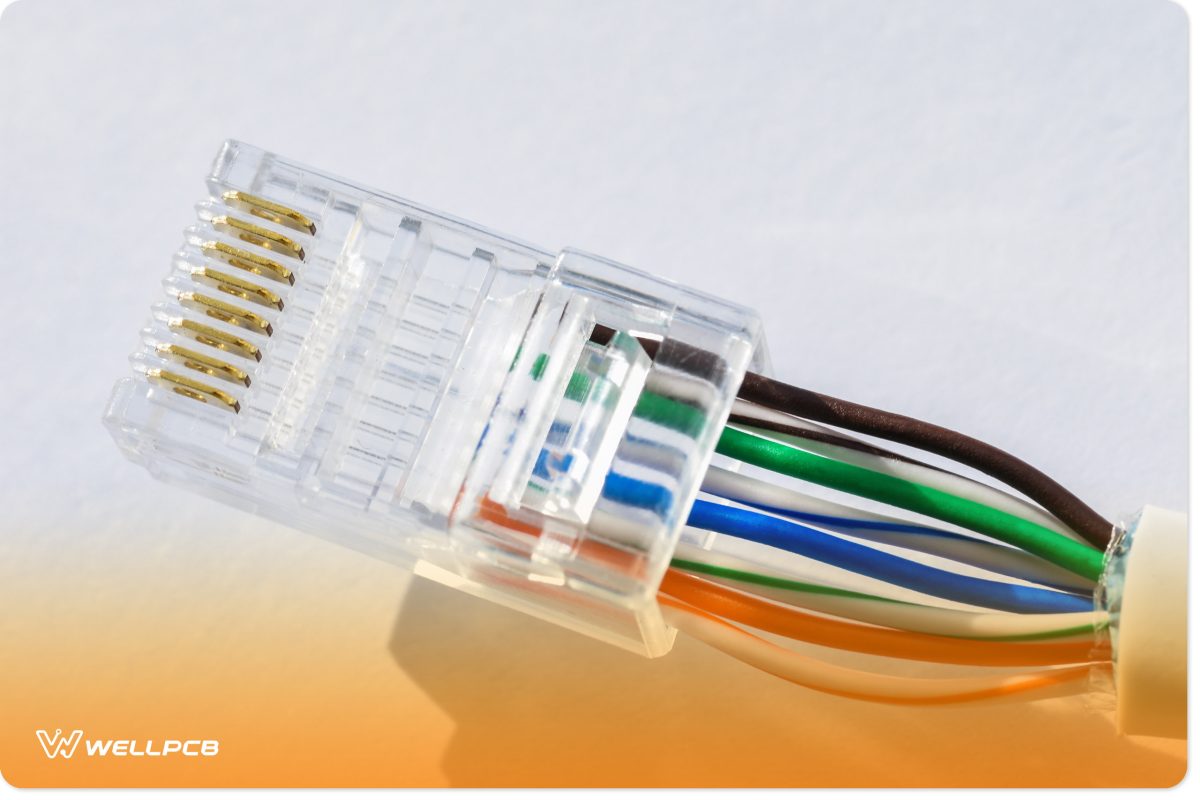
Connectors are devices used to join cables and networking devices together to establish communication.
- RJ-45 Connector - Commonly used with twisted pair cables in computer networks.
- BNC Connector - Used with coaxial cables for signal transmission.
- Fiber Optic Connector - Used to connect optical fiber cables and networking devices.
Networking Devices
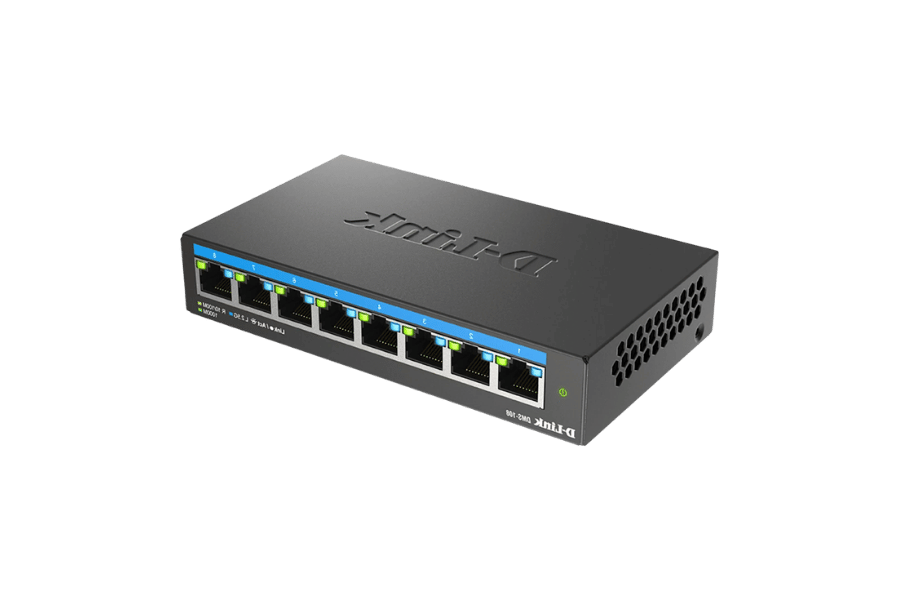
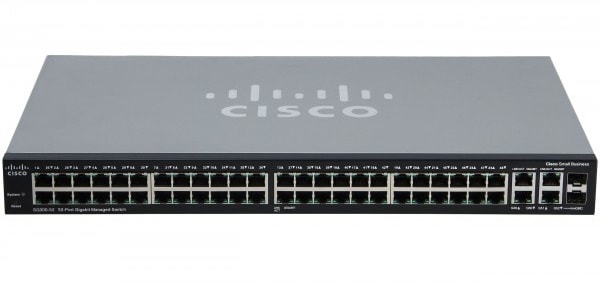
Networking devices are hardware components used to establish and manage communication within a network.
- NIC (Network Interface Card) - Connects a computer to a network.
- Hub - Connects multiple devices and broadcasts data to all connected devices.
- Switch - Connects multiple devices and sends data only to the intended destination.
- Router - Connects different networks and forwards data packets between them.
- Repeater - Regenerates weak signals to extend transmission distance.
- Bridge - Connects two network segments and filters traffic between them.
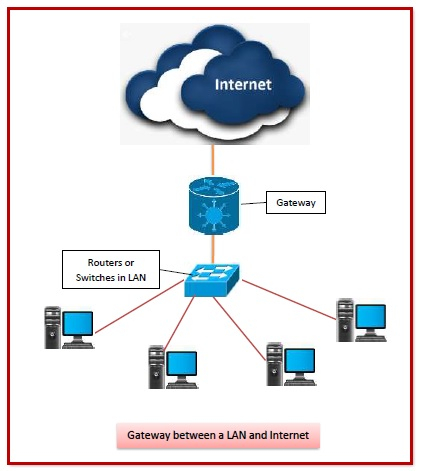
- Gateway - Connects networks that use different communication protocols.
- Modem - Converts digital signals into analog signals and vice versa for Internet access.
Network Topology
Network topology refers to the physical or logical arrangement of computers and networking devices in a network.
Advantages of Network Topology
- Helps in efficient network management.
- Improves communication between devices.
- Assists in troubleshooting network problems.
Types of Network Topologies
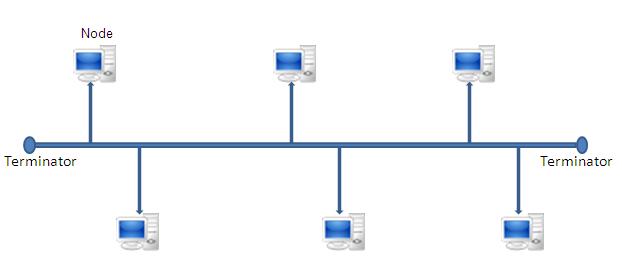
A. Bus Topology
All devices are connected to a single communication cable called the backbone.
Advantages
- Easy to install.
- Requires less cable.
- Low cost.
Disadvantages
- Backbone failure affects the entire network.
- Difficult to identify faults.
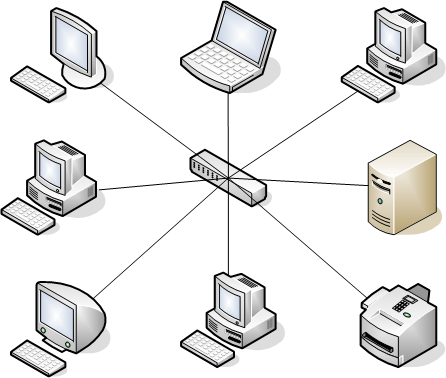
B. Star Topology
All devices are connected to a central hub or switch.
Advantages
- Easy to manage and troubleshoot.
- Failure of one device does not affect others.
Disadvantages
- Requires more cable.
- Failure of the hub or switch affects the entire network.
C. Ring Topology
Each device is connected to exactly two neighboring devices, forming a circular path.
Advantages
- Data travels in an organized manner.
- Performs well under heavy traffic.
Disadvantages
- Failure of one device can disrupt the entire network.
- Difficult to modify.
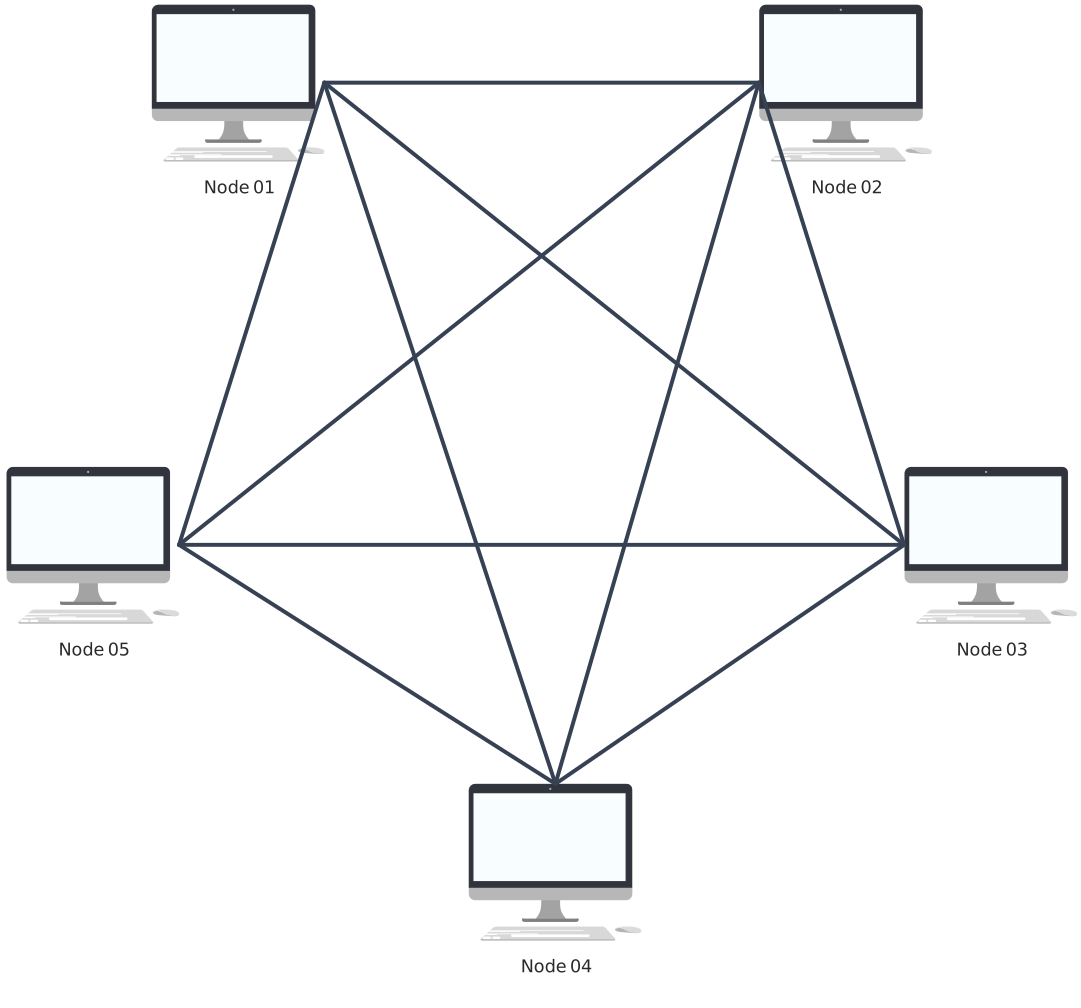
D. Mesh Topology
Each device is connected to every other device in the network.
Advantages
- Highly reliable.
- Provides multiple communication paths.
Disadvantages
- Expensive to implement.
- Requires a large amount of cabling.
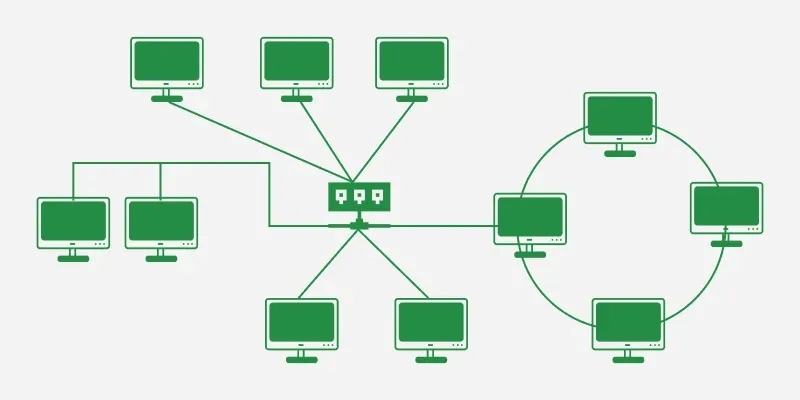
E. Hybrid Topology
A combination of two or more different network topologies.
Advantages
- Flexible and scalable.
- Can utilize the strengths of multiple topologies.
Disadvantages
- Complex design.
- Higher implementation cost.
Computer Network
A computer network is a collection of interconnected computers and devices that communicate and share resources.
Advantages of Computer Networks
- Resource sharing.
- Fast communication.
- Data sharing.
- Centralized management.
Networks Based on Coverage Area
A. PAN (Personal Area Network)
A PAN is a small network covering a very short distance around an individual.
Example: Bluetooth connection between a mobile phone and wireless earbuds.
B. LAN (Local Area Network)
A LAN covers a small geographical area such as a room, building or school.
Example: School computer laboratory.
C. MAN (Metropolitan Area Network)
A MAN covers a city or metropolitan area.
Example: City-wide cable television network.
D. WAN (Wide Area Network)
A WAN covers a large geographical area such as countries or continents.
Example: The Internet.
Network Architecture
Network architecture refers to the design and structure of a computer network.
Types of Network Architecture
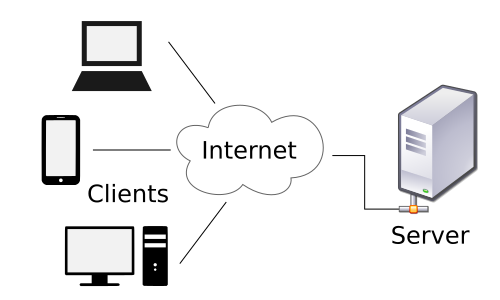
A. Client-Server Architecture
A network model in which a central server provides services and resources to multiple client computers.
Advantages
- Centralized management.
- Better security.
- Efficient resource sharing.
Disadvantages
- Server failure affects all clients.
- Higher setup cost.
B. Peer-to-Peer (P2P) Architecture
A network model in which all computers have equal responsibilities and can share resources directly.

Advantages
- Easy to set up.
- Low cost.
Disadvantages
- Less secure.
- Difficult to manage in large networks.
Network Protocols
Network protocols are sets of rules that govern communication between devices on a network.
Importance of Network Protocols
- Ensure accurate communication.
- Enable interoperability between devices.
- Provide security and reliability.
Ten Basic Network Protocols and Their Uses
| Protocol | Use |
|---|---|
| HTTP | Transfers web pages over the Internet. |
| HTTPS | Secure version of HTTP. |
| FTP | Transfers files between computers. |
| SMTP | Sends e-mail messages. |
| POP3 | Receives e-mail messages. |
| IMAP | Accesses e-mail stored on a server. |
| TCP | Provides reliable data transmission. |
| IP | Provides addressing and routing. |
| DHCP | Automatically assigns IP addresses. |
| DNS | Converts domain names into IP addresses. |
Concept of IP Addressing
An IP Address (Internet Protocol Address) is a unique numerical address assigned to every device connected to a network.
It helps identify and locate devices for communication.
Example: 192.168.1.1
Difference Between IPv4 and IPv6
| IPv4 | IPv6 |
|---|---|
| 32-bit address | 128-bit address |
| Uses decimal numbers | Uses hexadecimal numbers |
| Limited number of addresses | Very large number of addresses |
| Example: 192.168.1.1 | Example: 2001:db8::1 |
Difference Between Internet, Intranet and Extranet
| Internet | Intranet | Extranet |
|---|---|---|
| Public network | Private network within an organization | Private network accessible to authorized outsiders |
| Accessible to everyone | Accessible to organization members only | Accessible to selected external users |
| Largest network in the world | Limited to a specific organization | Extends the intranet to external users |

Few pointers on Some Networking Devices
- Hub - Shares Data across all devices in a network.
- Switch - Shares data to the target device in the network only by using MAC addresses to route information.
- Modem - Connects to the internet(ISP).
- Router - Connects multiple devices with LAN cable or wirelessly to a network.
- Gateway - It acts both as a modem and router in a single device. It can connect to the ISP for internet access and route that traffic across devices in a network using LAN cable or wirelessly.
- Network Architecture is defined as the design or structure/blueprint of a network that demonstrates how data transmission can take place in a network. On the other hand, Network Topology is defined as the physical or logical layout/arrangment of devices in a network.